- liversketchingclub
- Aug 11, 2022
- 0 min read
Updated: Jan 17, 2023


Updated: Jan 17, 2023
Following our hugely successful open sketching day in Liverpool ONE, we do hope that you can join us for another free event, once again en plein air with models. Everyone welcome!
Enjoy a relaxed day drawing and painting with us in this, the 150th anniversary year of The Liver Sketching Club and the 175th anniversary of Birkenhead Park.
We will be meeting by the Visitors' Centre in this lovely park on Saturday 20th August between 10am and 4pm.
Models will be sitting from 10.30 and wearing traditional dress and with a fabulous backdrop provided by the lake and the ornate Swiss Bridge.

Rept0n1x, CC BY-SA 3.0 https://creativecommons.org/licenses/by-sa/3.0, via Wikimedia Commons
There is a nice cafe open all day and free on-road parking is available near-by.
Plenty of shade is provided by the many trees.
Artists should bring their own materials and chair if required.
Under 16s to be accompanied by an adult please.

Alexandre Gravis, CC BY-SA 4.0 <https://creativecommons.org/licenses/by-sa/4.0>, via Wikimedia Commons
Liver Sketching Club website members can create and manage their own artist profile page with a mini gallery, artist statement and contact links.

Step 1: Log In to the website

Step 2: Select artist profile. from the drop-down members' menu

This will take you to you personal artist page. where you can create, manage and publish your artist profile and personal gallery.
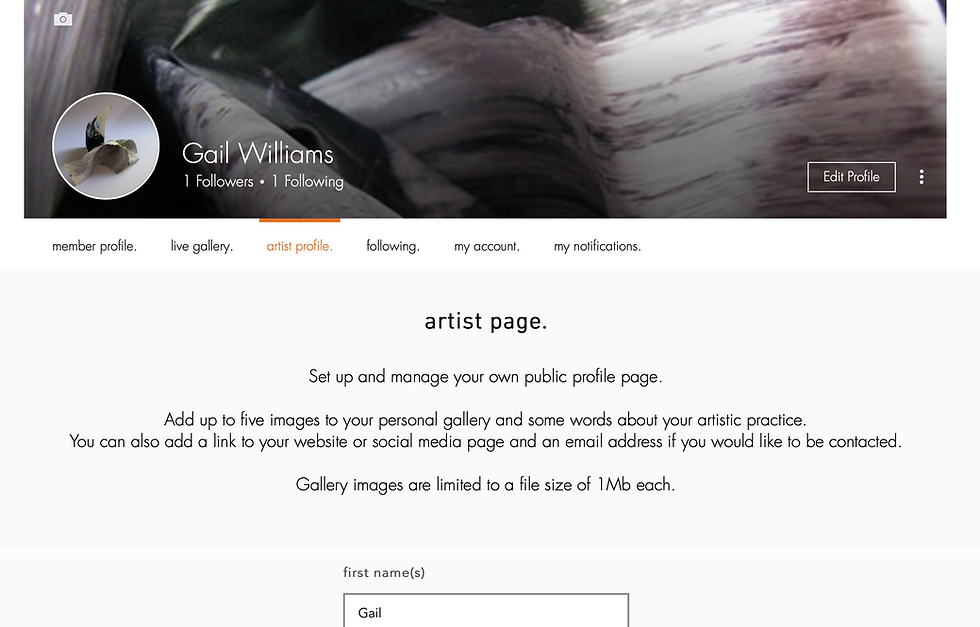
Step 3: Enter the names you wish to show on your profile page and an artist statement if you'd like to say something about yourself or you artistic process. You can leave any of these items blank if you wish.

Step 4: If you have a website or page on another site, then you can add a link to it. You can also add your email address if you would like to be contacted in this way. You can leave any of these items blank if you wish.

Step 5: Set up your personal gallery by adding some images of your work. You can leave the gallery empty if you wish.

To add an image click the select file + button. This will open a dialog box on your device so that you can select a picture and upload it to your gallery.
It looks like this on a MacBook and will be similar on a Windows computer, phone or tablet.

Ensure the file you select is less than 1Mb in size or you will see this message and the file will not upload. Resize the image on your computer or other device, or select another image and try again.

When your image has finished uploading, it will appear in your gallery.

If you wish, add more images up to a maximum of five. When you have reached this limit, the select file + button is disabled.

To take items out of your gallery, select the image you want to delete so that it shows in the main gallery frame and click the red remove image. button.

Step 6: Be sure to click save. before leaving the website page so you don't lose your changes when you navigate elsewhere.
If you have made changes you don't want to keep, click cancel.
If you wish to completely remove your profile and gallery, click delete profile.

Step 7: Add your page to the main website so that people can see it.
Your artist profile will only show on the main public-facing part of the club website when you tick the publish your artist page box and click save.
By de-selecting this tick-box, and clicking save. you can remove your artist profile from public view without deleting it.
To see your published artist profile page directly, without needing to navigate from the website home page, click view your artist profile page.
Finally:
If you have any questions about creating and maintaining your artist profile, just email liversketchingclub@yahoo.co.uk and we'll try our best to help.